Part 6 of the NixOS series covers how the model is wired into my system: the build, the service, the OpenAI-compatible API. It does not cover the part I actually spend time on, which is choosing the engine, the quantization and the context length for a specific piece of hardware. That choice is where the speed comes from, and it is the part I can now show you numbers for.
Weights plus KV cache
One line decides whether a model runs at all:
weights (parameters x bits per weight) + KV cache (context) <= RAM / VRAMQuantization buys you the first term. A model ships as 16 bit numbers; storing them at 4 or 5 bits divides the memory by three or four with little visible loss. The scheme I recommend to anyone, and the one both 35B models run, is Q4_K_M, around 4.8 bits per weight: most of what Q8_0 gives at half the size. The one exception is Qwen3.8-Flash-Next at IQ3_S, which is a much larger model whose experts can afford a tighter quantization. Below Q3_K_M quality falls off fast enough that the saved gigabytes usually cost more than they save.
The KV cache is the second term and the one people forget. When the model reads a token it keeps that token's keys and values in memory, because recomputing them at every step would mean re-reading the whole conversation each time. That store is the cache, and it grows with the context, which is why the context window is a physical limit rather than a setting: attention lets each token interact with every other one, so doubling the context roughly quadruples that work. Mine is stored at q8_0, eight bits per value instead of the sixteen a full-precision cache uses, which halves the memory the same window costs. Quantizing the cache is a separate decision from quantizing the weights and worth making on purpose: the weights decide what the model knows, the cache decides how much of the conversation it can hold.
Prefill and decode
Prefilling processes the whole prompt in parallel, which is what a graphics card is good at. Decoding emits one token at a time and is limited by memory bandwidth. On my machines the ratio between the two is around ten to one, so a harness that sends long prompts is paying a different cost than a chat that shows a short answer. This is the reason an agent loop feels nothing like a chat window pointed at the same model.
What each box runs
Both boxes are an i9-13900 with an RTX 3060 holding 12 GB of VRAM and 64 GB of RAM. The laptop is a ThinkPad T480 with an i7-8650U and 32 GB. These are readings taken while working, not a benchmark run:
| Box | Engine | Model | Decode | Prefill |
|---|---|---|---|---|
| amal | ik_llama.cpp, CPU only | Ornith 1.5 35B Q4_K_M, 256k context | 10 tok/s | not measured |
| gimel | llama.cpp | Cyber-Tiel-Coder 35B A3B with MTP, Q4_K_M, 1M context | 20 tok/s | 154 tok/s |
| gimel2, before | llama.cpp | Qwen3.8-Flash-Next, 256k context | 12 down to 6 tok/s | 55 tok/s |
| gimel2, now | Strata | Qwen3.8-Flash-Next IQ3_S, 256k context | 49 down to 45 tok/s | 997 tok/s |
Every row runs its cache at q8_0. The last two rows are the same machine, the same card and the same model at the same 256k context, with only the engine changed. Decode went from 12 tokens per second to 49, and from 6 with that context nearly full to 45. Prefill went from 55 to 997. That is the whole argument for the rest of this post. gimel is next on the list.
How a 125B model fits on a 3060
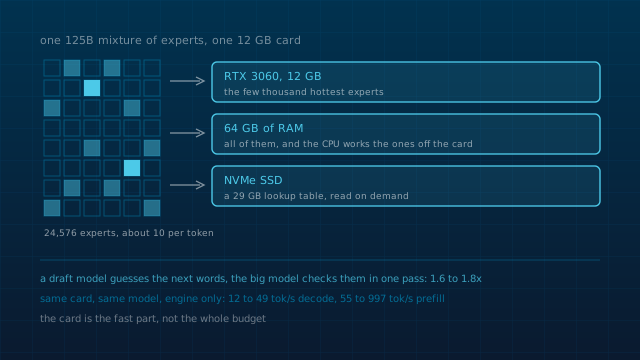
Qwen3.8-Flash-Next is a mixture of experts: 24,576 of them, and a single token only routes through about 10. That is what makes the model cheap per token and expensive to store. Strata is an MIT licensed inference engine built around that shape, and the way it makes the model fit is a placement decision rather than a smaller model:
- The few thousand experts used most often sit on the graphics card, which is the only part that has to be fast.
- All of them sit in the 64 GB of system RAM, and the processor works on the ones the card is not holding at the same time.
- A 29 GB lookup table stays on the SSD and is only read when an expert is needed that RAM is not holding.
- A small draft model guesses the next few words and the big model checks them in one pass, which the project measures at 1.6 to 1.8 times faster for the same answer.
The published figures are for an RTX 5070: 53 tokens per second of decode and 1,620 per second reading a prompt at IQ3_S. My card is a 3060 with 12 GB, and the table above is what that actually gives. The CPU matters more than it looks in that number, because the processor is not just orchestrating, it is holding part of the model.
The same reasoning explains the row above it. A 35B model at Q4_K_M is around 21 GB with a 32k context, which does not fit in 12 GB of VRAM either, so llama.cpp splits it between the card and RAM and runs it there. The difference is that a dense model has no experts to place selectively, so the split costs more.
The laptop throttles
10 tokens per second out of a CPU-only 35B is what an i7-8650U gives, and the ceiling there is heat rather than compute. The AVX2 load throttles the chip, so the rate you see is a sustained thermal number, not the one a short benchmark prints. That is why the laptop runs the small model and answers quickly about small things, and anything that needs a large context goes to a box with a card in it.
Context length has to match on both sides
The expensive part of running an agent locally is not the model, it is that a harness resends its instructions, its tool catalogue and its history on every step. In measurements I took for a session I ran in August 2026, a trivial task cost 14,700 input tokens because about 25 tool schemas go back with every step. In the same set of runs, a small model at 2.2 tokens per second on CPU never finished an agent turn at all.
Two rules came out of that, and both are configuration rather than modelling:
- The context a harness declares must match the context the server was started with. If the harness thinks it has more room than the server allocated, the middle of the prompt is dropped silently.
- Prefill is what an agent pays for, so a fast prefill changes what is pleasant to use before it changes what the model can reason about. That is the number that moved most when I changed engine: 55 to 997 tokens per second.
A Robotech formation from the same material
Writing this down for other people is what made it stick. I gave a Robotech formation, Des LLM aux agents locaux, built from the same material in three parts: what happens inside a model (tokens, embeddings, attention as queries, keys and values, why the KV cache makes context expensive), how to run one yourself (llama.cpp and GGUF, the quantization table, sizing weights plus KV cache against a machine, then a live llama-server), and what an agent harness adds on top (the loop, function calling, MCP, skills, AGENTS.md, and pointing DeepSeek Harness at a local endpoint).
The exercise is the part I am happiest with: three machines, one with no GPU, one with an RTX 3060 and 12 GB, one with 8 GB of unified memory, and the task is to pick model, quantization and context for each and justify it in one line against the budget. The deck, the demo scripts and the model landscape slide are in the Robotech Formation repository, CC BY-NC-SA 4.0, with the transformer figures from 3Blue1Brown.
If you are sizing your own box
- • Take the largest model family your machine holds at Q4_K_M, then decide the context before you decide anything else. The KV cache is not free and an agent needs a generous one.
- • Measure prefill and decode separately. If you only look at tokens per second of generation you will pick the wrong engine for agent work.
- • On a mixture of experts, the engine's placement strategy matters more than the raw card. A 12 GB card with 64 GB of RAM and a fast CPU beat what I expected from that card.
- • Make the harness context and the server context the same number, and check it after every change to either.
- • On a laptop CPU, plan around heat. A sustained rate is lower than a benchmark rate, and the difference is what you will actually feel.
Further reading
- Strata: the engine, and its model and size page for what fits in how much RAM.
- ik_llama.cpp: the fork I build on the laptop, with the CPU variant kernels part 6 explains.
- Formation Robotech: Des LLM aux agents locaux: the deck this post is a written version of.
- 3Blue1Brown on attention: the explanation the first part of the formation is built on.
Keep reading
The throughput figures are my own readings from daily use on the machines named in the table. The 1.6 to 1.8x draft figure and the RTX 5070 numbers are Strata's published measurements.