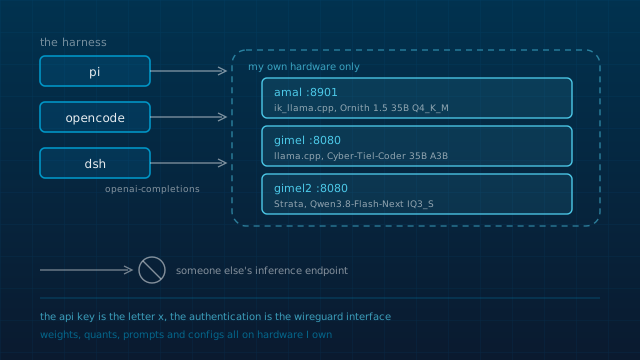
I run my own model, and part 6 of this series covers that side for the laptop: llama.cpp, a quantized GGUF file, an OpenAI-compatible API on a port. The two boxes on my tailnet run a different engine for a much larger model. This post is about the layer above both of them, the program you actually type into. That layer is the one I understood last, and it is the one I ended up configuring hardest.
Three harnesses went through the machine. Each left a config file and a directory of session logs, so everything below is something I can point at on disk rather than remember. The hostnames are my own names for my machines, and the config excerpts use them too.
What a harness decides
For a while I treated the harness as a product: you install it, it has a model behind it, you talk to it. Under that model of it, changing harnesses means changing what the AI can do, which is mostly false.
A harness is the thing that decides what goes into the context window, which tools exist at all, what happens when a tool call fails, how much of your machine the model may touch, and whether the conversation is summarized before it hits the limit. The weights are the part you usually do not control. Everything in that list is the part you do.
The first place that landed for me was a fourteen line file. Here is the entire model configuration I used with Pi:
{
  "providers": {
    "llama-server": {
      "baseUrl": "http://127.0.0.1:8900/v1",
      "api": "openai-completions",
      "apiKey": "local",
      "models": [
        {
          "id": "Ornith",
          "contextWindow": 131072,
          "maxTokens": 4096
        }
      ]
    }
  }
}
Two of those lines are hardware decisions wearing model clothes. contextWindow and maxTokens are a budget: how much prompt the model may hold, and how much room to leave for the answer. On a ThinkPad T480 serving a 35B model at Q4_K_M from CPU kernels, that budget is set by the machine, not by the model card, and a harness that never asks you for it is guessing on your behalf.
Three endpoints, three config files
Before I had picked a harness I had already put the model behind an HTTP URL. Three endpoints, all mine or on my tailnet, two engines behind them, all speaking the same OpenAI-compatible API:
amal, the ThinkPad I use every day, servingOrnith-1.5-35B-Uncensored-Q4_K_M.ggufon port 8901 through the ik_llama.cpp fork, built with all CPU variant kernels. Port 8901 rather than 8900 because SearXNG owns 8900 on that machine.gimelon port 8080, servingpeculiar-ragdoll/Cyber-Tiel-Coder-35B-A3B-GGUF-MTPover llama.cpp.gimel2on port 8080, running Strata, an MIT licensed inference engine built around one model, Qwen3.8-Flash-Next. The quant my current configuration names isIQ3_Sfrom the ISTA-DASLab GSQ-RCO files; an earlier one named Unsloth'sUD-IQ4_XS.
Once the model is a URL, a harness is a client, and a client is a config file. Here is the same decision in OpenCode:
"gimel2": {
  "name": "gimel2",
  "npm": "@ai-sdk/openai-compatible",
  "options": {
    "baseURL": "http://gimel2.tail5481a4.ts.net:8080/v1"
  },
  "models": {
    "qwen3.8-flash-next": {
      "name": "Qwen3.8-Flash-Next",
      "modalities": {
        "input": ["text", "image"],
        "output": ["text"]
      }
    }
  }
}
And the same decision again in the flake, as a patch the harness reads on activation:
{
  id = "llm-pi-ai";
  name = "@deepseek-ai/dsh-llm-pi-ai";
  config = {
    providers = {
      gimel2 = {
        displayName = "gimel2";
        apiKeyEnv = "GIMEL2_API_KEY";
        api = "openai-completions";
        baseURL = "http://gimel2.tail5481a4.ts.net:8080/v1";
Three syntaxes, one decision. That is why changing harnesses cost me an afternoon each time instead of a rebuild of how I work.
Strata uses parts of llama.cpp and ggml, so the engine on gimel2 and the engine on the laptop share ancestry, and both end at the same kind of URL. The hardware is uneven, and the API is what makes it one thing to configure against.
Which engine sits behind each of those URLs, which quantization it is served at, and what that costs in tokens per second on the three machines involved is a post of its own: Getting a 125B model onto a 12 GB card. From the harness side the endpoints differ in speed, not in protocol, and that is the only part that matters there.
Pi: one provider block and two packages
Pi (source, MIT) is deliberately minimal. No sub-agents, no plan mode, no permission popups, no background bash in the core; those are things you build or install as packages. What it gives you instead is control of the context: a small system prompt, AGENTS.md loaded from its own config directory and the directory tree, and sessions stored as a tree in one file so you can branch back to any earlier point.
My setup was the provider block above plus two packages, pi-web-access and pi-mcp-adapter, with telemetry switched off. Nothing else.
What it taught me came out of its session logs, which are plain JSONL. The largest session in the directory is the first attempt at this website. It ran 297 messages and 145 tool calls, and the split is the number worth knowing: 75 bash, 32 edit, 26 write, 12 read. Half the session was the model checking what the shell would actually do. Reading that ratio is the first harness skill I developed, and it says more about a run than the transcript does.
Pi's lack of opinions is honest, but it means everything above the primitives is yours to build, and building it is exactly the work a small local model is worst at.
OpenCode: providers, plugins and compaction
I had downloaded OpenCode once before and put it down again without getting anywhere with it. The time I actually used it is the time that produced the config below, and it is the harness where I spent the most tokens: 16,028,123 input and 2,659,633 output on the ledger, for a recorded cost of $0.04, because nearly all of it went to my own endpoints.
OpenCode ships with the machinery Pi leaves out: sub-agents, plan mode, a permission system, LSP integration. My config points it at three local providers, adds three MCP servers (one of them nix run nixpkgs#mcp-nixos, for NixOS option lookups), sets "bash": "ask" and "edit": "allow", and installs six plugins:
"plugin": [
  "oh-my-openagent",
  "opencode-skillful",
  "opencode-supermemory",
  "opencode-notifier",
  "opencode-scheduler",
  "opencode-dynamic-context-pruning"
],
"compaction": {
  "auto": true,
  "prune": false,
  "reserved": 10000
}
The last two of those are the local-model adaptations, and they are the part of the config I would defend. A context pruning plugin and a compaction step that holds 10,000 tokens back are not there to make the agent clever. They are there because with a local model, context is not a bill, it is minutes of my own hardware, and a session that drags its whole history is slow in a way that stops you working.
The plan plugin keeps a work ledger at ~/.omo/boulder.json with named plans, an agent name and elapsed time. The entry for this website records 95 minutes for the plan that produced the first commit. The same ledger and the session database show the shape of that run: a parent session, then short-lived children doing the reading, one of which took 905,542 input tokens to produce 11,678 output tokens of summary. Sub-agents multiply context faster than they multiply useful work, and when the model is local the price arrives as waiting rather than as money.
DeepSeek Harness: installed by the flake
DeepSeek Harness is what I run now, and it won on the one thing the other two did not offer: it installs as a Nix flake input, so the harness is part of the system I rebuild rather than something I installed once with npm.
programs.dsh = {
  enable = true;
  profiles.web = {
    bundles = [
      pkgs.dsh.bundles.base
      pkgs.dsh.bundles.web-app
      pkgs.dsh.bundles.web-ui
    ];
The provider is the patch quoted above, so every activation rewrites it, and the API key it reads is the string "x", set in environment.sessionVariables. The endpoint does not authenticate, because reachability is the tailnet, and Strata's own documentation says any key and any model name will be accepted. I would rather declare a dummy than keep a secret in a file that is not secret.
The two timeouts in ~/.dsh/settings.yaml are both 900,000 ms. Fifteen minutes of patience is arithmetic rather than caution: gimel2 reads a prompt at 997 tokens per second, so a 30,000 token first message costs about half a minute before the first token of the answer appears, and an agent run stacks several of those. It also answers one request at a time unless you turn on batching. A harness with a shorter default will kill work that was going fine.
agent-default-model:
  provider: gimel2
  model: qwen3.8-flash-next-iq3_s
The practical difference from the other two is recovery. A fresh machine, or a wiped home directory, gets the model endpoints, the timeouts and the default model back from nixos-rebuild switch. There is nothing to re-download and no key to go looking for.
What stays on my machines
Worth stating precisely, because "local AI" gets used loosely:
- The quantized model files sit on hardware I own, and the engine on the laptop is built from source by a Nix expression I wrote.
- The endpoints are tailnet hostnames. Nothing is listening on the WAN, and the authentication is the WireGuard interface rather than a token.
- Prompts, tool output and session history stay on my machines. The session logs are the reason this post exists, and no third party has a copy of them.
- The harness configuration is in the same git repository as the rest of the system config.
One boundary I would rather state than gloss over: the OpenCode config also carried the free hosted models that provider ships with, and I used them for tasks the laptop could not carry. Those sessions are separable in the same database, and the rule I would keep is to know exactly which ones they were rather than to pretend the setup is all local.
This repository, three harnesses
This repository is the cleanest test case, because all three touched it or touched a version of it. Pi wrote the first attempt, a Next.js app. OpenCode rebuilt the idea, then dropped the framework, leaving a directory with index.html, style.css and app.js, and then ran the plan that produced this repo. DeepSeek Harness has been writing it since. The repo does not care which program made a commit, and that is the point: the parts that made it swappable were decided before any harness was chosen.
| Harness | How the model is wired in | What I tuned for a local model |
|---|---|---|
| Pi | a 14 line models.json, one openai-completions provider | context window 131072, completion budget 4096 |
| OpenCode | provider blocks on @ai-sdk/openai-compatible, three hosts | compaction holding 10000 tokens back, a pruning plugin, bash set to ask |
| DeepSeek Harness | a patch in the flake, one provider, dummy key | 900000 ms timeouts, an IQ3 quant as the default model |
If you are building the same workflow
- • Put the model behind an OpenAI-compatible URL before you choose a harness. It is the decision that made every later change cheap.
- • Set the context budget yourself. A harness default is written for a hosted model, and on a laptop it is usually wrong in both directions.
- • Keep
AGENTS.mdin the repository rather than in the tool's config. It is the one artifact that survived all three harnesses unchanged. - • Read the tool-call mix in the session log before blaming the model. 75 of 145 calls being
bashis a fact about the task. - • Put the harness configuration in the same flake as the system, so a rebuilt machine gets the workflow back on its own.
Further reading
- Pi and its source: the minimal harness, and the page listing what it deliberately does not ship.
- OpenCode: the config schema my provider, plugin and compaction blocks are written against.
- DeepSeek Harness: the plugin architecture and the NixOS module I install it through.
- Strata: the inference engine on the two tailnet boxes, and the page that explains how a 125B mixture of experts is split across GPU, RAM and SSD.
- ik_llama.cpp: the fork behind the laptop endpoint.
Keep reading
The numbers come from the session directories and databases each harness keeps, plus the flake module that configures the current one, all on the machine they happened on.